

-
vigilantinvestigationagency@gmail.com
Send Email
-
Bharthal, Dwarka Sector 26, New Delhi – 110077, India
Visit Our Office
+91 62-995 5-3308
Confidentiality Guaranteed
+91 62-995 5-3308
Confidentiality Guaranteed
Blog Details
-
vigilant Investigation Agency. > Awareness > How to Identify a Fake Email: Warning Signs You Should Never Ignore
17
Sep
Sep
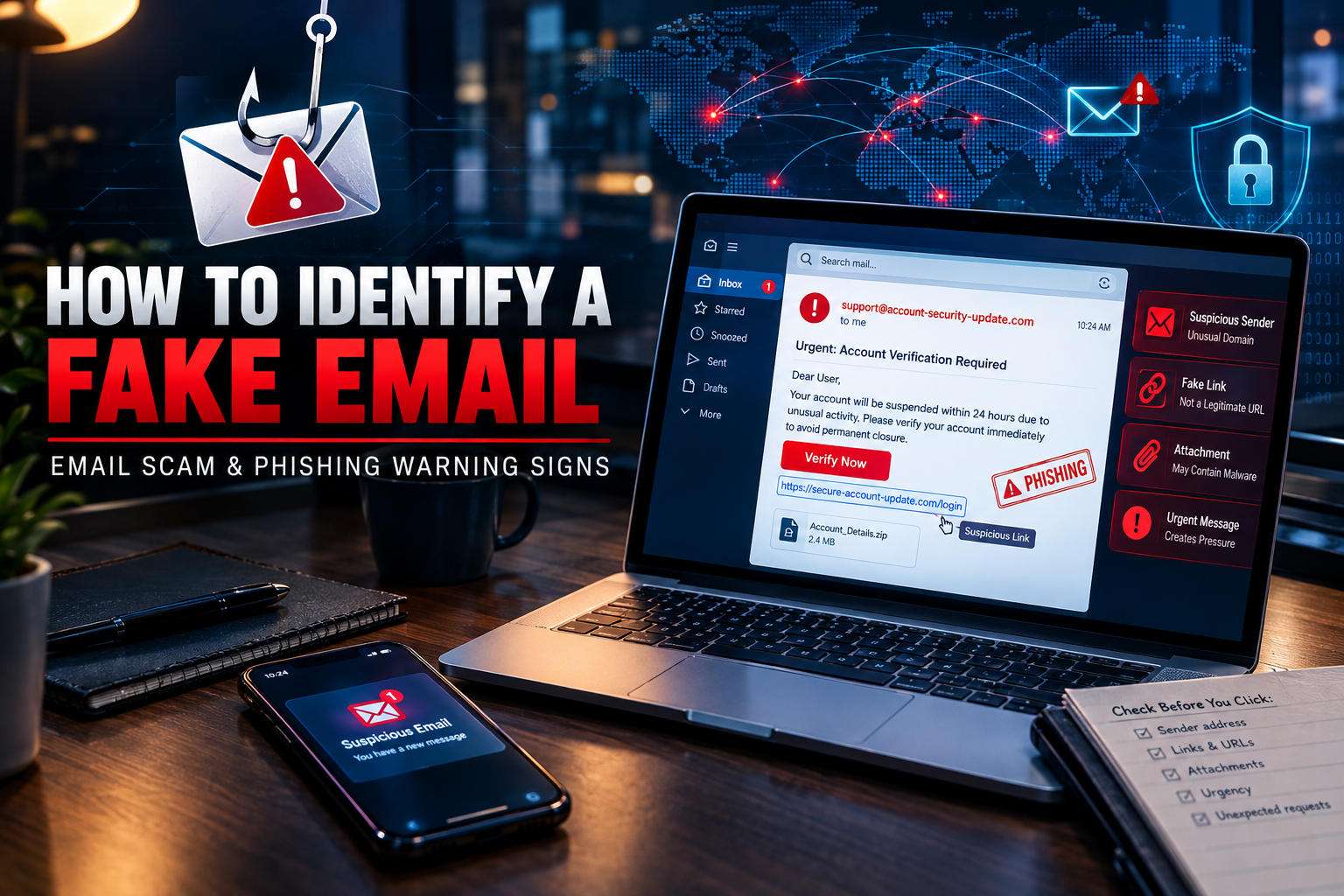
How to Identify a Fake Email: Warning Signs You Should Never Ignore
Fake emails have become one of the most common tools used in online fraud. Scammers often create messages that look like they are coming from banks, companies, government departments, delivery services, employers, or even people known to the recipient.
The goal is usually to make the recipient click a harmful link, reveal confidential information, transfer money, download a malicious file, or respond with sensitive details.
Learning how to identify a fake email before taking any action can help reduce the risk of financial loss, identity theft, account compromise and other forms of cyber fraud.
What Is a Fake Email?
A fake email is a message designed to appear legitimate even though it has been created or sent for a deceptive purpose.
Some fake emails are poorly written and easy to recognize. Others can be highly convincing, using company logos, professional-looking layouts, familiar names and urgent messages.
A fraudulent email may claim that your account has been blocked, a payment has failed, a parcel is waiting, an unusual login has been detected, or immediate action is required.
The appearance of the email should never be treated as proof that it is genuine.
1. Check the Sender’s Email Address
One of the first things to examine is the actual sender address.
Scammers may use addresses that look similar to legitimate business addresses but contain small differences. These may include extra characters, unusual domains, spelling changes or unrelated email services.
For example, an address may look convincing at first glance but use a domain that has nothing to do with the organisation mentioned in the message.
Always check the complete email address rather than relying only on the sender’s displayed name.
2. Be Careful With Urgent Messages
Fake emails frequently try to create panic or pressure.
Messages such as:
“Your account will be closed today.”
“Immediate payment is required.”
“Your verification has failed.”
“Click now to avoid suspension.”
are designed to encourage quick decisions.
Legitimate organisations may sometimes send urgent notifications, but unexpected pressure should still be treated as a warning sign.
Take a moment to verify the information independently before clicking anything.
3. Do Not Trust Links Automatically
A fake email may contain a link that appears to lead to a familiar website.
Before opening a link, carefully check where it actually points. A suspicious link may use a strange domain, shortened address, misspelled company name or unrelated website.
If an email claims to be from your bank or another important service, avoid using the email link. Instead, open the organisation’s official website or application directly and check whether there is a genuine notification.
4. Look for Requests for Sensitive Information
Be especially cautious if an unexpected email asks for sensitive information.
This may include:
Passwords
OTPs
Bank account details
Card information
PINs
Identity documents
Login credentials
Security codes
Never assume that a message is genuine simply because it uses official-looking language or branding.
If the request involves financial or account security information, verify it through an independent official channel.
5. Examine the Language and Formatting
Poor spelling and unusual grammar can sometimes indicate a fraudulent message, but sophisticated scams may contain professionally written content.
Look for inconsistencies such as unusual wording, strange formatting, unexpected greetings, incorrect company information or a message that does not match the organisation’s normal communication style.
However, good grammar does not prove that an email is legitimate.
6. Be Careful With Unexpected Attachments
Unexpected attachments can present serious security risks.
A fraudulent email may contain an invoice, job offer, payment document, delivery notice or account statement designed to encourage the recipient to open a file.
Do not open an unexpected attachment simply because the file name appears professional.
If you were not expecting the document, independently contact the sender using trusted contact information and confirm whether it was actually sent.
7. Verify Financial Requests Separately
Emails requesting money deserve additional attention.
A scammer may impersonate a manager, business partner, supplier, family member or financial institution and request an urgent transfer.
Before making a payment, confirm the request through another trusted communication method. Do not use the telephone number or contact details provided only inside the suspicious email.
A second verification step can prevent a fraudulent transaction.
8. Watch for Account Login Alerts
Some fake emails imitate security notifications.
They may claim that someone has logged into your account from another location or that your password needs immediate verification.
Instead of clicking the provided link, access the account through its official website or application. Check recent login activity and security notifications there.
This helps distinguish a genuine security alert from a phishing attempt.
9. Check Whether the Message Was Actually Expected
Ask yourself a simple question:
“Was I expecting this email?”
If you never ordered a product, an unexpected delivery message should be treated carefully.
If you never applied for a loan, an unexpected loan approval email deserves verification.
If you never requested a password reset, do not automatically follow the reset link.
Unexpected communication does not always mean fraud, but it is a reason to verify before taking action.
10. What If You Have Already Clicked a Suspicious Link?
Do not panic.
If you clicked a suspicious link, avoid entering additional information. If you entered a password, consider changing it immediately through the legitimate website and review account security settings.
If financial information was exposed, contact the relevant bank or financial institution through its official channel as soon as possible.
If you downloaded a suspicious file, avoid opening it further and consider getting the device checked by a qualified cybersecurity professional.
Where money has already been transferred, prompt reporting may be important.
Can a Detective or Investigation Agency Help?
Some email fraud cases involve more than a single suspicious message. They may involve impersonation, repeated fraudulent communication, financial losses, identity misuse or a wider network of individuals.
In appropriate cases, a professional detective or investigation agency may assist with lawful fact-finding, documentation and information gathering. Digital evidence can sometimes become important when establishing the sequence of events and understanding how a fraudulent communication was used.
However, investigations should be conducted lawfully and with respect for privacy and applicable regulations.
Why Email Fraud Awareness Matters
Cybercriminals continue to use social engineering because people often respond emotionally to fear, urgency or attractive offers.
The most effective protection is not simply recognizing one particular type of scam. It is developing the habit of verifying unexpected requests before taking action.
A genuine-looking logo, familiar name or professional email design does not guarantee authenticity.
Final Reminder
Before responding to an unexpected email, stop and verify.
Check the sender address. Examine links carefully. Be suspicious of urgent requests. Never casually share passwords, OTPs or financial information. Verify payment requests independently and avoid opening unexpected attachments.
A few extra minutes of verification can prevent a much bigger problem later.
If an email appears suspicious, do not let pressure make the decision for you. Verify first, act second.

